

“This is your chance to make your hard literary work shine!”
AT the pointy end of independently publishing a book, creative decisions come rushing at us from all directions. The pressure is on to have everything ‘perfect’ and ready, but don’t be fooled into thinking that’s the way it is in the book trade! Traditionally published books go through plenty of trial and error on their way to bookshelves. Here’s some tips about getting the look and feel of your book right, including the most controversial… your book cover.
Sense of entitlement
Writers love to dream up brilliant book titles that inspire our writing process, but we’ll often fight like cornered animals at the very suggestion of letting those ideas go. After all, our books are unique brainchildren, so the names we give them are incredibly personal; but as a book is approaching publication, and a final title needs to be settled on, remain open to alternatives.
Revive the Thesaurus
Beta readers are often the key to great title ideas. They are invariably our books’ first readers and can usually identify our themes more clearly. One of the best ways to spark title ideas is to ask beta readers to name a few keywords that came to mind as they read our manuscripts. Look these up in a thesaurus and you’ll soon see there are many ways to say the same thing, using several incredibly unique words to do so.
 Book trade wisdom
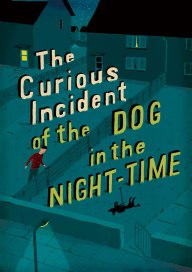
The international marketplace is the best place to identify book title parameters. Long titles (more than six words) can struggle to maintain visual presence in online book sites, although there are plenty of successful examples, like Mark Haddon’s The Curious Incident of the Dog in the Night-Time (2003). Many successful series rely on a short ‘master’ title, like the Twilight series, allowing varied and often longer sub-titles. Non-fiction books traditionally require straplines, a form of sub-heading.
Title theft!
We all want to be original, but chances are there are other books out there with the same or similar titles as ours (there will be at least one other writer with your name, also!). There is no copyright on titles. Somewhere between accepting everything is unique but few things are original, your book will find its place. Don’t call your American Civil War novel Gone With The Wind, of course, but don’t stress about similarities with other books and authors.
Judging a great book
The overwhelming majority of readers will judge your book instantly on its cover. Googling ‘book covers’ will lead you into internet nightmare country: everyone has an opinion in this highly contentious space. My advice is to keep things very, very simple. Engage a cover design artist or work up your own cover on software like Photoshop or Canva. The basic version of Canva is free to use, with templates and very low-cost elements for sale within it (such as images) to make perfectly good eBook and paperback covers.
 Keep it simple
One strong image, one point of focus. Less is more on an effective book cover.
Size matters
Books are invariably sold with only the front cover at thumbnail size on desktop or mobile screens. The cover image and typography need to work effectively at that tiny scale. If buyers cannot read your cover, or get something from its imagery, they’ll keep looking.
Where’s the edge?
Most online booksellers and printed book catalogues display book covers against a white background. If you want your cover to stand out, make sure it’s got solid edges. White or light covers will tend to disappear.
A designer relationship
If you’ve got strong ideas about your book cover and can operate basic computer software, it’s probably best that you design your own cover. Expecting to pay a designer to merely push buttons for you while you muck around with ideas will drive you both insane and cost you a lot of money. If you have no visual skills at all but you’re excited by the prospect of what an experienced creative will come up with, engage a designer by agreeing on price, time scale and outcomes beforehand.
“Your designer may come up with the winning idea at the very last stage of design.”
What to expect from a cover designer
It’s acceptable to expect that a designer will come up with an initial range of ideas for you both to choose a general design direction from; it’s also acceptable for a designer to argue their case with you – always stay open to ideas that come out of the blue. Designing is a creative process, just like writing, so accept that your designer may come up with the winning idea at the very last stage of design, just like your manuscript takes best shape close to the end of the rewriting process.
Picky clients pay more
If you keep making changes, expect to be charged. Good designers accept there will always be some amendments – three free alteration sessions is the standard (and appears in traditionally published book contracts) – but if you take the piss, it’ll appear on your bill.
What a designer will expect of an author
Time. Nothing great ever came from a rush job. Furnish your designer with complete, accurate cover copy (title, author name and blurb) that will not require any changes to be made; and a cover template (with your book’s unique barcode). Basic respect for their process should be a given, but it’s unfortunately quite rare. You might have spent years on your book, so an effective ‘face’ on it will take weeks or months to get right.
Ebook covers
Your online publishing platform will supply you with the correct dimensions for creating your eBook cover, which will be the equivalent of just the front cover of a printed book (no spine, no back cover, no barcode). Check this great video on how to use Canva to create an effective eBook cover.
Paperback covers
Your print on demand (POD) publishing platform will supply you with a template (usually with a barcode, if you give them your ISBN) based on the number of pages in your paperback document. Remember, the page count will always be greater than the number of pages allocated a page number in your book (it’s got front and end matter, right?). Remind yourself about the elements of book building). If you change the number of pages in your book’s interior file, the width of the book spine will change and you’ll need to re-size your cover design accordingly. Here’s a great video on how to use Canva to create an effective printed book cover.
Brilliant blurbs
Everywhere your book is sold and marketed – online, bookshop shelves, bibliographic services, libraries – there’s a chance to attract readers with a great sales pitch, and there is no reason to use anything different to your back cover blurb. When creating a great blurb, the best place to start is the plotting work you did on your book. Keep it short – it’s not supposed to be a synopsis – and keep the reader guessing about your story’s turning points.
Where’s your proof?
The trial and error of independent book publishing will become apparent once you receive an uncorrected proof of your book, the culmination of years of hard literary work. Most POD platforms allow you to order one version of your title after you’ve uploaded the interior and exterior files. This small spend is your chance to save yourself hours of angst (and plenty of money) by holding one copy in your hand and checking it for accuracy.
Recap
The publishing industry uses many tried and true techniques to create books that look and sound great to buyers. There is no need for independent publishers to reinvent the wheel – emulate the book trade and allow your publication to seamlessly take its place among the titles available to hungry readers. Don’t attempt a book cover design unless you’re very sure you know what’s expected, but if engaging a designer, it’s still a good idea to get across the elements of effective book design to ensure the process runs smoothly. This is your chance to make your hard literary work shine!
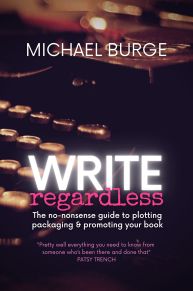
An extract from Write, Regardless!
© Michael Burge, all rights reserved.

 The classic first edition cover image (which places Clive and his mother right within the typography of the title) hints at storylines that James avoids, and which would be far more interesting to this reader than most of his ‘boy scout’ adventures.

 Your eBook cover
 Michael Burge Media