A writer’s review on Germaine Greer’s White Beech.
“Greer has a better time relating to animals than she does humans.”
ON the 2006 death of ‘Crocodile Hunter’ Steve Irwin at the barb of a stingray, Germaine Greer infamously declared: “The animal world has finally taken its revenge”.
Portrayed as uncaring in the international media, Greer was at the time custodian of a piece of South East Queensland rainforest, in the midst of rehabilitating it from a dairy farm, banana plantation and logging resource.
The habits of local flora and fauna were commanding her attention as a cross-section of living ecology and heritage, but she was also making it the subject of what surely ranks as the greatest feat of research ever undertaken on the one plot of Australian land.
The result was published as White Beech, and it’s quite a read.
Once again, Greer provides an enormous wealth of research, so much that White Beech is as much a textbook as it is a memoir.
Her deft search for any semblance of Aboriginal ownership of the land is bravely captured, and it’s a necessity in a book which tackles the very notion of land being property, but it’s so dispassionate the writer opens herself to controversy in a manner which has now become like clockwork.
Greer pushes the boundaries of archival knowledge further with each of her books, but as a memoir I felt White Beech to be a bit of a let down. Surely there is plenty more to know about the process of rehabilitating the forest, the obstacles Greer faced and the stories of those who helped her.
While she describes pivotal encounters with several animals at Cave Creek over the years (particularly the bower bird who Greer says called her to purchase the place), these vignettes reveal plenty about the author’s true affection for the natural world, but they also suggest Greer has a better time relating to animals than she does humans, and this is perhaps why there is little human drama in the tale… but let us in on the reasons!
Can this be the same writer as Daddy We Hardly Knew You, which blended tremendous accounts of human frailty with the elemental environments that story traversed?
Revisiting where she was at with the rainforest at the time of Irwin’s death would have been an interesting plot point. Perhaps the controversy was painful, but it would have made for more courageous storytelling.
Yet you can see Greer trying. Whole conversations are published in inverted commas, but they don’t ring true as real dialogue, despite having the odd colloquialism thrown in. Great literary non-fiction this would be, if it framed the story of Cave Creek in a classic story arc, which I refuse to believe was impossible, given ‘one woman and her forest’ has all the hallmarks of the greatest plots.
Greer lets her academic front down for a rare moment in the chapter ‘Bloody Botanists’ when she speculates on the sexual orientation of naturalist and explorer Ludwig Leichhardt, after revealing she also feels Australian icon Sir Joseph Banks may have been a perennial bachelor for a reason.
“You have to wonder whether plant-hunting was a way for gay men to escape from societal pressure,” she writes.
Do we have to wonder? Given her ability to research literally anything, what prevented Greer from leaching the archives on this subject? Evidence on Banks and Leichhardt’s contemporary Matthew Flinders has fleshed-out a living, breathing homosexual mariner.
She could also take a leaf out of other writer’s forests, like that of E.M. Forster, to find what she has in common with LGBTI wordsmiths, plantsmen and women, and their sense of place.
If Greer was willing to do more than write about her gut feelings, it would set her apart from the one-dimensional approach to nature (human and otherwise) she observed so bravely in Steve Irwin.
“The one lesson any conservationist must labour to drive home is that habitat loss is the principal cause of species loss,” Greer wrote in The Guardian on the occasion of Irwin’s death, just one peak on her climb to the summit of understanding what she so deftly captures in White Beech.
‘Diary of a Conservationist’ would have been a better subtitle, had White Beech revealed more about Greer than her cracking research skills, for a conservationist is what she became in her rainforest years.
Because I suspect this transformation involved much more than research.
Well, if you’re an independent Australian artist, probably not.
There is a simple reason for this, and it’s going to be hard for many commentators and readers to accept: for decades now, arts in Australia have been funded in a trickle-down manner that Margaret Thatcher would be proud of.
I’m an artist who practices several art forms. I am a fiction and non-fiction author, playwright and painter, and I’ve also worked as an actor, illustrator, designer and filmmaker.
Funding? Yeah, tried to get that many times, but I failed far, far more often than I succeeded. I genuinely wonder what it’s like to have public funds to practice my art. I imagine it’s a bit challenging, especially being accountable to the funding body (and the public), but I’ve never been in that right time at that right place to get my ticket to the top floor of Australia’s arts sector.
Although I haven’t let that stop me. Ever since graduating two decades ago, with two art diplomas, I’ve worked a string of day jobs to support myself while I practice my art. I thrive while telling stories, it’s in my DNA and I’ll never give it up; yet if I’d had to rely on the meagre income generated from my art, I would have given up long ago.
That’s not to say I subscribe to the notion that my output should have no currency just because it comes naturally. Far from it! Artists should be paid well for our skill and our time. The trouble is, creating a market for art in this country right now is almost impossible whether you’re funded or not.
The problem for independent artists is not funding, it’s access.
HERE’S AN IDEA Malcolm Turnbull wants innovation, but not from artists.
But artists are in it up to our eyeballs, already risking everything with the best of them. I innovate, particularly as an author. In the past two years I’ve been agile enough to teach myself how to publish quality books – my own – using the online tools that are at the fingertips of any burgeoning writer.
In many art forms, from literature to live performance, it’s now possible to create content and generate sales channels via the internet and social media. There’s a sense that artists harnessing these continually expanding innovations have no known boundaries, but unfortunately this is not the case. Audiences simply don’t know we’re there, and for artists, no audience equals no consumers (and therefore no income) for our art.
Anyone who’s self-published books will tell you how hard it is to interest the mainstream media in their titles. It simply doesn’t matter how excellent and innovative the product is, if it hasn’t been fostered by a major publishing house it’s unlikely to make it into the critical context of mainstream book reviews, literary festivals and awards.
This is no surprise. The major publishers created this critical mass decades ago to sell their titles within, and they don’t want competition from the thousands of writers who annually get rejected by mainstream publishing and turn to the DIY book revolution.
I’ve been selling my books into a market with no such protections for my work, as have countless other independent Australian writer-publishers. If authors supported by the Australian publishing industry are taking a hit, join the queue behind the rest of us! You’ll get a higher return per sale of every book if you self-publish, so what’s stopping you from going it alone?
That’s an easy one to answer: artsworkers – those employed to facilitate art. In the case of book publishing, these are the editors, designers, proofreaders, publicists and other professionals who put writers’ books together for the marketplace.
Some artsworkers are also artists (I’ve been known to cross over more than once), and they’ve been highly visible of late, expressing disappointment at funding cuts that will impact their bottom line and their forward estimates.
“It’s past time for getting real about arts access and distribution in Australia.”
In a sense, artsworkers have more to lose than artists, although many have framed these lean times as the contributing factor in employing less artists. I suspect many companies will cut art rather than cut artswork, at least initially, but many will simply run out of funds for both, and that is where the greatest shame lies in this debate. As a result, artists will have to learn to stop relying on artsworkers to develop our careers.
I abhor wholesale cuts to the arts, but we’ve been on the frontline of the blade for centuries, seen as a frivolous, non-essential extra. The argument against that definition is too obvious to construe here, but I encourage artists to do what we have always done: keep making art.
Artsworkers have a different challenge, and it’s past time for getting real about arts access and distribution in Australia. If our political leaders want innovation in the publishing sector, then a literary competition in this country need only launch an independent book-publishers’ award. The rest will follow.
But right now, literary awards have a snobbish, unnecessary block to independent authors making a decent splash in Australian publishing by locking us out of competition, publicity, exposure and opportunity.
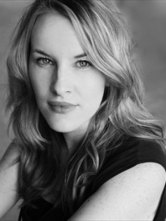
Actor and playwright Kate Mulvany (pictured) used multi-story metaphors this week when she urged major theatre companies to notice what is being amputated on the lower floors of an already struggling performing arts sector in Australia, and to do something about it by keeping the top floor open.
“We need to keep those voices on the ground floor and middle floors ringing out with Australian stories or our much-loved house will collapse beneath us,” she said. “If they’ve been evicted from the middle and ground floors, then invite them upstairs.”
Consumers of art could do a lot better too. If you are really outraged by arts funding cuts in this country, you should already be buying independent Australian art.
Have you ever purchased an independently published book, created by an author who has self-funded their entire enterprise? Do you buy from high-street shops or from independent Australian artisans who are innovating as best they can in a marketplace dominated by cheap imports?
Do you support independent Australian films at the box office? Are you aware of burgeoning independent theatre festivals in Australian cities?
Are you signing-up to The Arts Party to make your concerns heard in our parliament?
I’m all for innovation spreading new-wave tendrils into the arts sector – who would be foolish enough to attempt stemming the flow anyway?
But if politicians want to support the arts, while butchering funding for artists, ‘there’s never been a better time’ for them to make small budget-neutral changes with big impact by starting with opportunities at their fingertips.
I look forward to ‘having a go’ by entering an Innovation in Independent Publishing Award at the 2017 Prime Minister’s Literary Awards, personally guided into existence by whichever leader wins the next federal election. The state Premier’s literary awards will follow suit, of course, by creating categories that no major publishing house will be eligible to enter books into, and I can’t wait to buy every title on that shortlist.
Art happens regardless of politics, and Australian artists will never be silenced by cuts to funding. Many of us are already proving our durability in the independent sector… if you can’t hear us, you’re just not looking in the right places.
“Aliases, gender dysphoria, cross-dressing, bisexuality, homosexuality and performing have always gone hand in hand.”
OUTING lesbian, gay, bisexual, transgender and intersex (LGBTI) performers has long been an emotive and legal tightrope for historians, but 400 years since William Shakespeare’s death, it’s time to look where academics have feared to glance.
When Shakespeare’s fellow actors John Heminges and Henry Condell oversaw the publication of his complete works in 1623, they included a page of “The names of the Principall Actors in all these Playes”.
It was never illegal for women to perform on the stage in Shakespeare’s era, but it was seen as an unthinkable moral breach akin to prostitution. The solution was to cast boys in the female roles.
So of this list of twenty-six male performers, which must include those who played heroines from Juliet to Cleopatra, which fellows donned the skirts?
FOLIO FELLAS The names of the men who created the roles of Shakespeare’s plays.
Ruling out those credited with male roles leaves a cluster of men who began their careers as ‘boy players’and wouldn’t register on any acting roll of honour – Alexander Cooke, John Shancke, Samuel Crosse, Nathan Field and Nicholas Tooley – yet all were shareholders in England’s premier theatre company The King’s Men.
Henry VIII’s Buggery Act of 1533 ensured LGBTIs remained invisible for centuries in the performing arts, however, it’s simply not credible to assume all the men on Shakespeare’s cast list were straight.
So I’ll add historical evidence to conjecture and show how easy it is to make room for a same sex-attracted transgender woman within a Shakespearean playhouse, and why she left almost no trace.
The record shows that twice-widowed Susan Tooley was on the market for husband number three in 1592. If we imagine her 10-year-old son, Nicholas, showed early signs of acting skill, we can paint Susan as a stage mother who made use of a known link the boy’s father’s family had to the Stratford-upon-Avon Shakespeares.
“Shakespeare attempted to dampen the Puritan inferno by writing a batch of heroines who cross-dressed as men.”
If the Tooleys – landed Warwickshire gentry – agreed to make the introductions that got the child off Susan’s genteel apron strings and into the hotbed of sodomy and vice that the Elizabethan playhouse was considered to be, I imagine they enforced one important condition. The boy, by that time listed in the records of London’s Court of Orphans as ‘orphan Tooley’, would have needed an assumed name.
We know from his will that Nicholas Tooley had an alias – the undistinguished surname ‘Wilkinson’. Perhaps it was coined for him in 1595, when a gifted lad was required for a crucial role in a new play?
Pamphlets from that decade reveal the playhouses came under the most intense Puritanical fire against boys cross-dressing on the public stage. If it was ‘orphan Tooley’ who appeared opposite Richard Burbage in the world premiere of Romeo and Juliet, the 13-year-old may wisely have cross-dressed as ‘Nick Wilkinson’.
Imagining the production was a hit allows us to cast ‘player Wilkinson’ opposite Burbage in Shakespeare’s regular new plays. The workload, and the pressure to maintain a slight physique, may have led the teenager, twice in 1599, to seek treatment from Simon Forman, London’s leading astrologer and herbalist. Forman’s notes reveal Tooley complained to him of “melancholy… moch gnawing in his stomak & stuffing in his Lungs.”
We know Shakespeare attempted to dampen the Puritan inferno by writing a batch of heroines who cross-dressed as men; but this could also have been a way to make performing lead female roles easier on one talented, ailing adolescent. The playwright let audiences in on the laughs, however, and created some of the best homoerotic scenes in theatre history, in Twelfth Night and As You Like It.
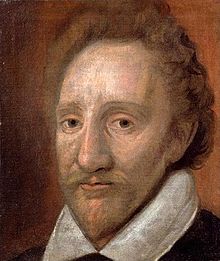
MASTER BURBAGE Player Richard Burbage (Dulwich Gallery, London).
When ‘orphan Tooley’ reached his majority in 1603, Richard Burbage applied to the Court of Orphans to have him indentured. Clearly, ‘player Wilkinson’ had become indispensable, and since the authority had no choice but to use his birth name on the paperwork, Nicholas Tooley finally emerged as a player.
Under the terms of his apprenticeship, the young man was accommodated by the wider Burbage family, London’s leading theatrical dynasty.
Surely it was the relentless playhouse work, wrangling not only his own scripts but also his master’s, performing before enormous crowds in the pre-eminent popular entertainments of the day, that led to Tooley’s elevation to shareholder of The King’s Men by 1605.
For anyone on the payroll to make a career as a leading lady would have drawn plenty of negative attention; but Shakespeare’s next move suggests he recognised the dramatic potential of one man’s ability to convincingly inhabit feminine authority, passion and lust.
When the playwright dropped the cross-dressing of comic female heroines and created his most complex female roles – Desdemona (1603), Lady Macbeth and Cleopatra (both 1606) – one review showed the impact.
In a performance of Othello by the King’s Men in 1610, a consummate actress fooled diarist Henry Jackson into writing: “She always acted the matter very well, in her death moved us still more greatly; when lying in bed she implored the pity of those watching with her countenance alone.”
Was this Desdemona played by Nicholas Tooley at the height of ‘her’ powers?
ROARING GIRL Mary Frith, aka Moll Cutpurse, arrested for performing on an English stage.
Onstage gender boundaries were being tested. In 1611, Londoners were thrilled and scandalised by the performance of a woman at the Fortune Theatre – Mary Frith, alias Moll Cutpurse, the infamous ‘Roaring Girl’.
Her subsequent confession to the Consistory Court states: “She told the company there p[re]sent that she thought many of them were of the opinion that she was a man, but if any of them would come to her lodging they should finde that she is a woman & some other immodest & lascivious speaches she also vsed at that time And also sat there vppon the stage in the publique viewe of all the people there p[rese]nte in mans apparrell & playd vppon her lute & sange a songe.”
Mary’s arrest, public shaming and penance were the playhouse gossip of the 1612 season and surely struck fear in the heart of every cross-dressing performer.
Now 30, Tooley was overlooked for the title role in a play by the newest writer on the scene, John Webster, whose The Duchess of Malfi ushered in the next generation of boy players, playwrights and shareholders.
My story, Merely Players, drew inspiration from this pivotal moment in Western theatre history.
Tooley’s one documented attempt at playing a male role was in Webster’s hit tragedy, while witnessing his replacement emerge; so it’s not a stretch to imagine his melancholy returned with force as he struggled to maintain his identity in the playhouse.
It’s also common for an intense period of playing passionate lovers to lay fertile ground for a relationship offstage; so it’s not incredible to suggest that Tooley and Burbage had an ongoing affair that came under threat as master’s career continued while apprentice’s declined.
My story has Tooley making a gender transition while disappearing for years into one of the few places that I believe would have taken him in – London’s Convent of Saint Helen. Here, she may have fooled the nuns into thinking she was a woman. The name I imagine was easiest for her to adopt was one she’d already used – Mistress Wilkinson.
After hearing that her old master is not well, I have her strolling back into the Globe playhouse in 1619, where she uncovers much hanging in the balance.
“Any number of participants in Western theatre’s groundbreaking era could have been LGBTIs.”
Before his death in 1623, the never-married Nicholas Tooley used his birth name to legitimise significant financial gifts to a coterie of women, including his master’s sister-in-law Elizabeth Burbage, “in whose howse I doe now lodge as a remembrance of my love in respect of her motherlie care over mee”. He stipulated the funds were to be paid into the womens’ “owne proper hands” and not to any husband.
The document reveals a man who spent much time in the company of a large number of women, and knew the legal impediment that marriage placed on daughters, wives and sisters inheriting monies independently.
But Tooley also signed a codicil identifying himself as “Nicholas Wilkinson alias Nicholas Tooley”, which no historian has ever thought to investigate as a cisgender dead name.
Any number of participants in Western theatre’s groundbreaking era could have been LGBTIQ, it’s simply a matter of ending the academic silence.
Aliases, gender dysphoria, cross-dressing, bisexuality, homosexuality and performing have always gone hand in hand, and apart from sharing the stage when cisgender English women finally got public support for bursting onto the stage in the 1660s, in 400 years not much has changed behind the scenes.


 While she describes pivotal encounters with several animals at Cave Creek over the years (particularly the bower bird who Greer says called her to purchase the place), these vignettes reveal plenty about the author’s true affection for the natural world, but they also suggest Greer has a better time relating to animals than she does humans, and this is perhaps why there is little human drama in the tale… but let us in on the reasons!


 Are you signing-up to


 Aliases, gender dysphoria, cross-dressing, bisexuality, homosexuality and performing have always gone hand in hand, and apart from sharing the stage when cisgender English women finally got public support for bursting onto the stage in the 1660s, in 400 years not much has changed behind the scenes.
